


ThunderPOS for Cloud for Javascript-capable Web Browsers

Accessible and easy point of sale and inventory management
Cloud users can manage their store from any device on the ThunderPOS.net website. And with the addition of the Web Register, you can now process transactions through the web, just like with Windows or iPad. The site allows you complete control to manage things like items, customers, employees, purchase orders, promotions, store settings, etc. You can also run over 30 types of reports, view transactions and sales at any store, create transfers between your stores and more! One user is included for ThunderPOS.net per register license; you may purchase additional users beyond this limit for $25 per month per user.

Features
- Manage your inventory and pricing from anywhere
- View reports and sales history
- Enterprise available, allowing for powerful management of multiple stores
- Web-based register functionality is available, relieving the need to have a windows or ipad station
- Manage employees, their permissions, and their schedules
- Create and receive purchase orders from anywhere


For video tutorials, please visit our Youtube site!
ThunderPOS For Consignment Stores for Windows 10 & 11

ThunderPOS for your Consignment Store
ThunderPOS is the latest version of our point of sale software. Adding popularly requested features such as customizable reports, different register templates, and full touch register support, ThunderPOS is a massive step forward in both power and simplicity for any consignment store, with features to fulfill any needs you may have.
Features
- Track consignors and their contact information, balances, and inventory.
- Flexible commissions system allows you to set defaults on the consignor or item level
- Ability to do a wide range of items, from books to figurines, clothing to furniture.
- Easily sell a mixture of consignment items from different consignors, or store merchandise, on the same invoice. ThunderPOS will keep track of commissions to be paid to the appropriate consignor for you!
- Use item variations to generate different sizes or colors of clothing or other items with different styles, and easily link them to the same consignor.
- Easily receive in stock or return stock of items to and from your consignors
- Generate statements for mailing to your consignors for periods of your choosing
Screenshots
For video tutorials, please visit our Youtube site!
ThunderPOS for Vape Stores for Windows

Simple and powerful point of sale
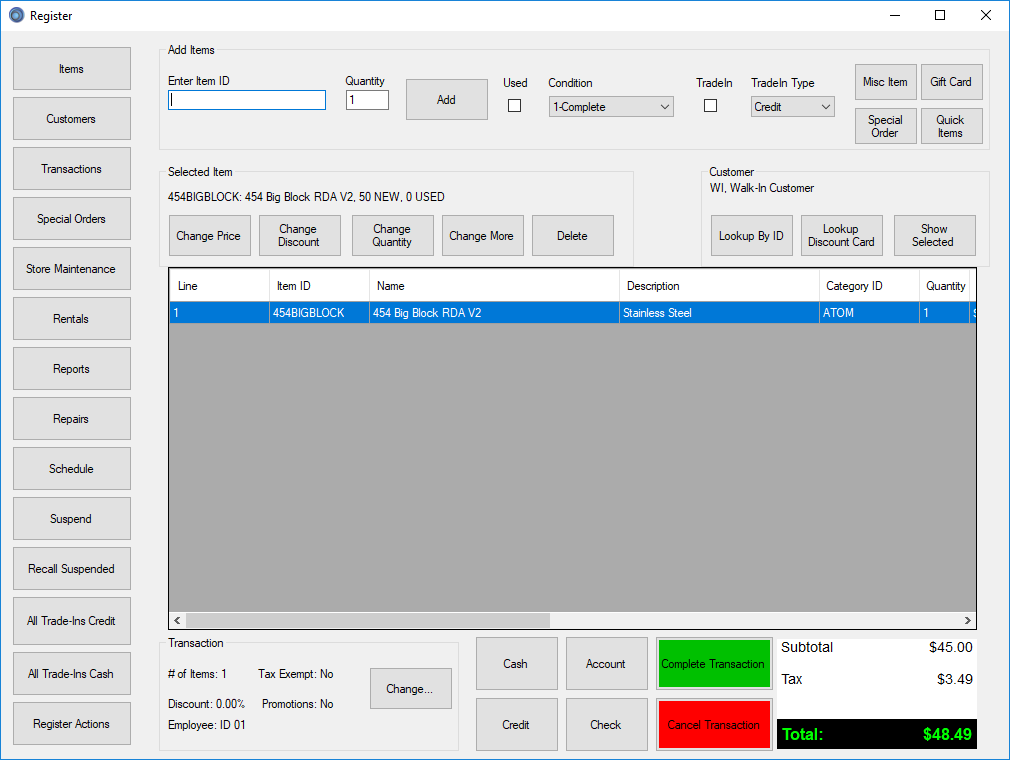
ThunderPOS is the latest version of our point of sale software. Adding popularly requested features such as customizable reports, different register templates, and full touch register support, ThunderPOS is a massive step forward in both power and simplicity for any retail store, and is particularly focused on vape stores.
Features
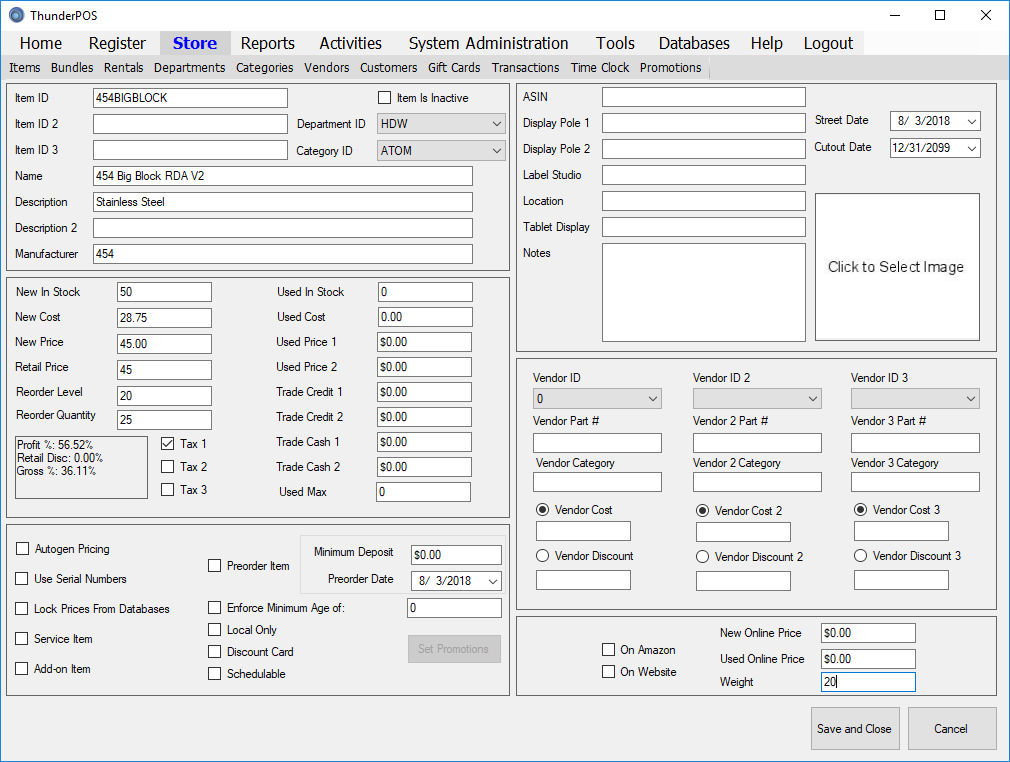
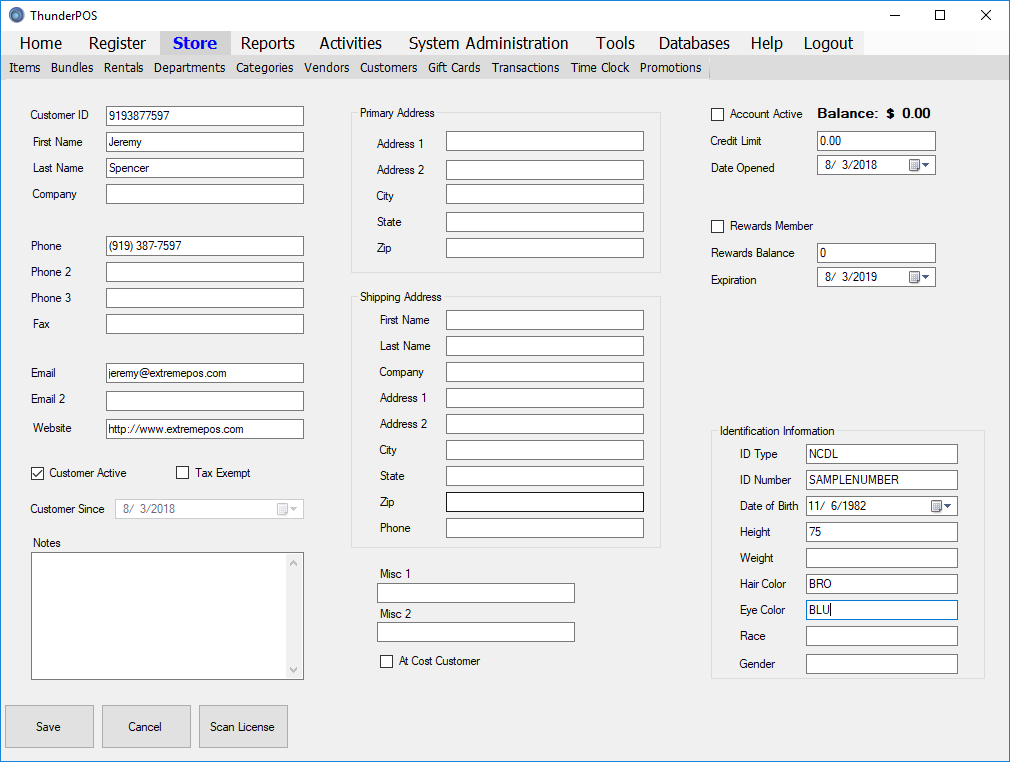
- Age Verification to keep you safe
- Quick product management
- View and add customers and balances
- Customizable, powerful sales and inventory reporting
- Manage employees, their permissions, and their schedules
For video tutorials, please visit our Youtube site!
ThunderPOS for iPad for iPad/iOS

Tablet Register Software for Cloud Users
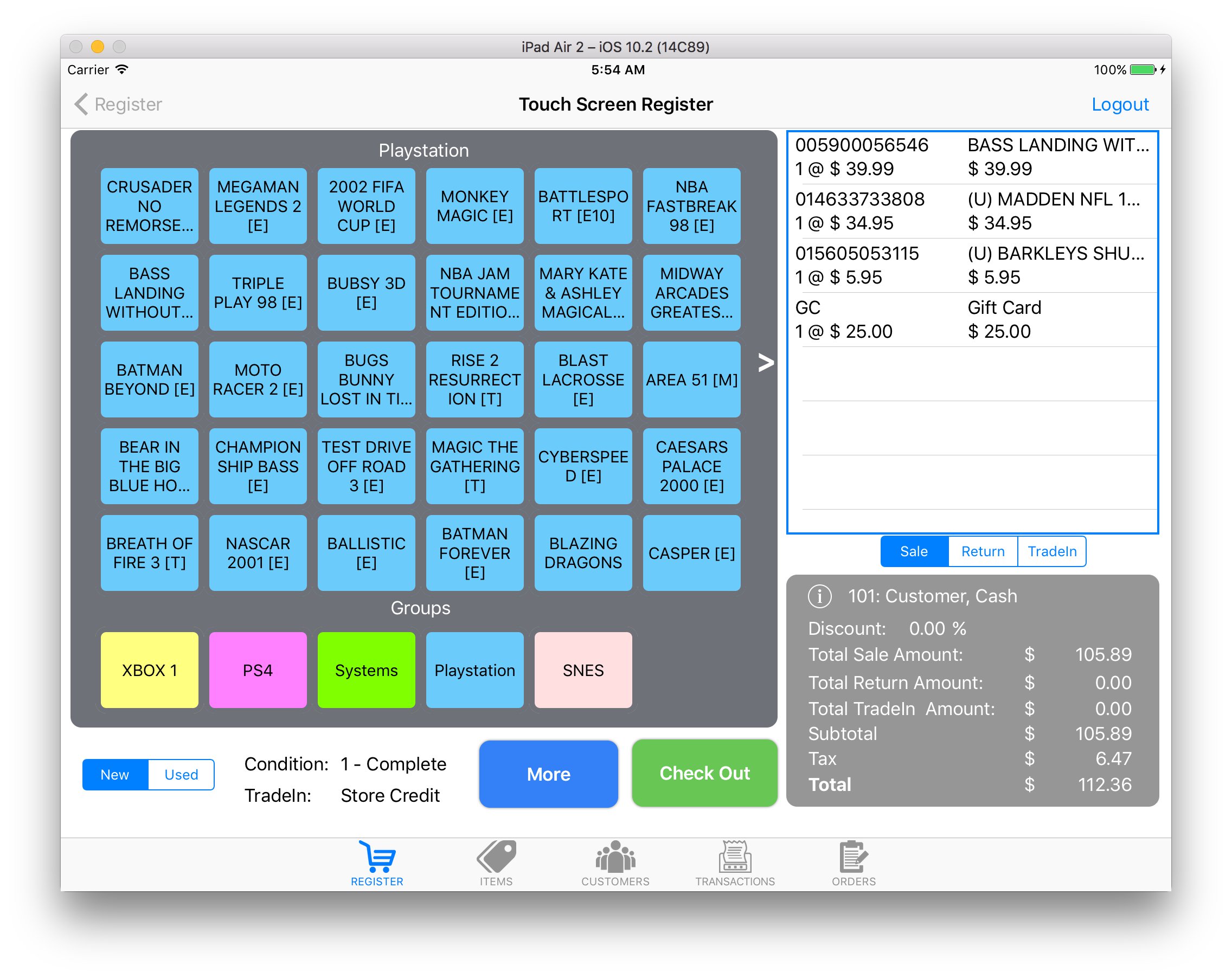
The ThunderPOS iPad register for iOS can handle all the functions you need to interact with the customer, including sales, returns, trade-ins, new and used product, searching products, placing and picking up special orders, viewing and adding customers, etc. Supports bluetooth barcode scanner, receipt printer, and cash drawer for a full Point Of Sale station. Want to try ThunderPOS out? Download it from the App Store
Features
- Two alternate screens for processing transactions at the register. The standard register screen allows you to scan items with a standard bluetooth scanner. The touchscreen register is for stores that prefer to present a list of items for the cashier to select from. The touchscreen can be configured from your ThunderPOS.Net account. Both screens make it simple to sell new or used items, and to accept trade-ins in up to five conditions. You can even vary your trade-in price based on whether you are paying store credit or cash. ThunderPOS for iPad also allows you to place and take deposits on special orders and pre-orders. Optionally, you can even import new items on the fly from numerous industry databases.
- Sell and redeem gift cards quickly and easily. Look up balance on any gift card at the register
- Process credit cards with an integrated card reader with supported merchant services
- Search and view your inventory items by item ID, name, description, category, dept, etc. View information on any of your inventory items and add it to the transaction as new or used. Serial numbered items are also supported.
- Search and view your customers by customer ID, name, phone number, etc. View information on any customer, including store account or loyalty program information. Update customer information such as phone number and address at the register. Add new customers to your store database.
- Search and view previous sale, return and trade-in transactions. Search by customer, date, register, cashier, etc. View all items sold on previous transactions and add an item to a return with one click.
- Search and view all open customer orders, including special orders and pre-orders. Select an order being picked up and put it on the current transaction.
- Add bluetooth barcode scanner, receipt printer, and cash drawer for a full Point Of Sale station
Screenshots




For video tutorials, please visit our Youtube site!
Ecommerce Integration Options for ThunderPOS Cloud

Use Extreme Point of Sale Products to Manage Your eCommerce Website
Connect your ThunderPOS Cloud account to your BigCommerce, Shopify, or WooCommerce store! Easily list your inventory and have stock linked to be removed in store when sold online! See our new site for many more details
Features
- Create items within the POS and have them automatically appear on the website
- Have the system automatically maintain stock levels and pricing information online as you make changes and sales at the local level
- Be alerted to orders from the site, and have the inventory you ship deducted from the site
- Ease the process of setting up for online sales
Screenshots
For video tutorials, please visit our Youtube site!
ThunderPOS Enterprise for Windows
Enterprise Services for ThunderPOS for multistore
These services and special versions of ExtremePOS®, Musicware, and Praiz POS are able to have inventory items, customer information and balances, gift cards and balances, vendors, departments and categories centrally managed for multiple stores. Do transfers from store to store, check inventory in real time, share customer account and gift card balances between stores, update items at all stores through your thunderpos.net account, and more!
Features
- Real-time stock checks for other locations
- Queuing of labels for price changes of in stock levels
- Easy checking of gift card and customer account balances
- Lock down item changes from the store-level employees.
- Items, including pricing, titles, and other information
- Customer information
- Customer balances
- Gift card balances
- Departments
- Categories
- Vendors
- Store Transfers
Centrally store and manage the following from your ThunderPOS.Net location:
Screenshots

For video tutorials, please visit our Youtube site!
Payment Processing for ThunderPOS®
Payment processing systems can speed up your transaction time in order to maximize your efficiency and enhance the customer experience. We have several options for integrated payment partners.
Features
- FREE software built into your POS
- Support for all major credit cards
- Options for contactless and EMV payments
- Contact Sales if you wish to be put in touch with our integrated partners!
- Compatible hardware purchase may be required
Screenshots
For video tutorials, please visit our Youtube site!
Praiz® POS for Christian Bookstores for Windows

Powerful, Affordable and Reliable Inventory Control for New & Used Christian Bookstores.
Welcome to Praiz® POS, home of the finest Inventory Control and Point-of-Sale software for Christian Bookstores. We are proud that over the years, we have successfully computerized the daily operations of hundreds of bookstores, CD stores and gift stores in the US and overseas. Extreme Point of Sale, Inc has been proud to bring you Praiz® POS since 2001.
We work closely with industry groups such as CBA as well as many of the top one-stops and wholesalers in the USA. Our software is compatible with and integrates to Ingram's Companion®/Flashback4® to save the user data entry time.
PraizMarketingBooklet.pdf

Features
- Intuitive customizable invoicing screen
- Buy/Sell/Rent/Trade Inventory
- Customer backorders, special requests
- Add customers on the fly, create customer barcode labels for quick scanning at POS
- Multiple invoice printing options
- Put invoices on hold
- Customer accounts receivable (payments on account)
- Sell and redeem Gift Cards
- Take preorders on upcoming items
- Supports Rear Customer Display Application
- Buy, Sell, Trade and Rent
- Interface with Industry Databases
- Power Over your Inventory
- Improve Customer Care
- Keep Track of your Customers
A complete retail solution for stores handling new and used products. Ring up sales, trade-ins, and rental items on the same invoice!
Save a great amount of data entry time by pulling information from the Bowker's Books In Print or Ingram's Companion databases. Electronically order from Ingram/Spring Arbor and STL/Appalachian.
Know your exact inventory levels. Automatically fill out purchase orders for low stock items. Keep your stock levels of new and used items at the level YOU want!
Speed up your transactions. Suggest used product instead of new in order to increase your profit margins. Have a quick, accurate lookup to see if an item is in stock. Make your customers feel as though they've gotten the highest quality of service possible!
Your current customers are your most likely future customers. Keep a mailing list for them. Keep accounts for a credit line, or for store credit from trade-ins. Make occasional mailings of special offers to bring them back to your store.
- Add, change, and review inventory
- Connect to Spring Arbor's online data services
- Track rental items
- Handles various item number types (UPC, EAN13, ISBN, and user defined)
- Microsoft SQL Server database engine, either on premise or in the cloud
- Automatically generate barcodes on the fly
- Sales history tracking for both new and used items
- Create Departments with options for touch screens.
- Manual and automatic filters for fast ordering
- Accept as ordered, positive and negative receiving
- Add customer "special orders" to purchase orders
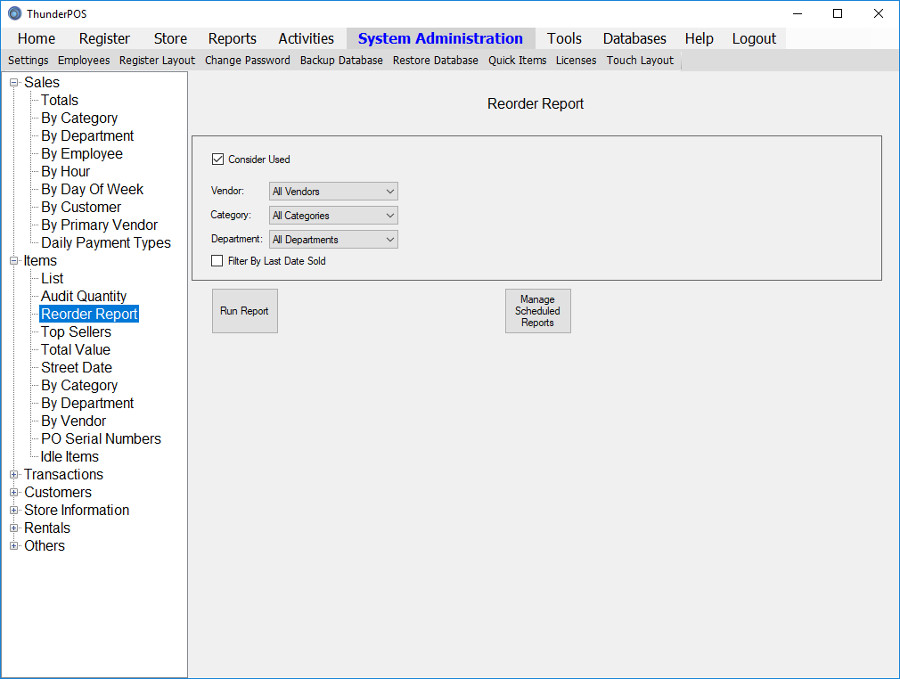
- Various sales and inventory reports
- Rental reports
- Accounts receivable
- Customer sales history
- "Top Sellers" reports
- Employee hours and wages
- Gift Card Reports


For video tutorials, please visit our Youtube site!
Musicware for CD/DVD Stores for Windows

for New & Used Music Stores, CD stores and DVD stores
Musicware is one of the finest Inventory Control and Point-of-Sale software for music, record, and CD and DVD Stores. Musicware was one of the first POS software applications to specialize in providing systems designed by music store owners for music store owners, and continues to maintain that quality of design today. We are proud that over the years, we have successfully computerized the daily operations of hundreds of music, record, and CD stores in the US and overseas. Extreme Point of Sale, Inc has been proud to bring you Musicware since 2001.
We work closely with industry groups such as NARM and Soundscan, as well as music wholesalers in the USA. Our software is compatible with databases from Super D, VPD, BRE Software and others.

Musicware is SoundScan compatible!
Features
- Manual and automatic filters for fast ordering
- Accept as ordered, positive and negative receiving
- Add customer "special orders" to purchase orders
- Intuitive customizable invoicing screen
- Buy/Sell/Rent/Trade Inventory
- Customer backorders, special requests
- Add customers on the fly, create customer barcode labels for quick scanning at POS
- Multiple invoice printing options
- Put invoices on hold
- Customer accounts receivable (payments on account)
- Sell and redeem Gift Cards
- Take preorders on upcoming items
- Supports Rear Customer Display Application
- Add, change, and review inventory
- Quick Import from vendor databases such as AEC or Discogs
- Track rental items
- Handles various item number types (UPC, EAN13, ISBN, and user defined)
- Microsoft SQL Server database engine, either on premise or in the cloud
- Automatically generate barcodes on the fly
- Sales history tracking for both new and used items
- Create Departments with options for touch screens.
- Buy, Sell, Trade and Rent
- Interface with Industry Databases
- Power Over your Inventory
- Improve Customer Care
- Keep Track of your Customers
A complete retail solution for stores handling new and used products. Ring up sales, trade-ins, and rental items on the same invoice!
Save a great amount of data entry time by pulling information from the Superfile database. Easily track your Soundscan reporting information!
Know your exact inventory levels. Automatically fill out purchase orders for low stock items. Keep your stock levels of new and used items at the level YOU want!
Speed up your transactions. Suggest used product instead of new in order to increase your profit margins. Have a quick, accurate lookup to see if an item is in stock. Make your customers feel as though they've gotten the highest quality of service possible!
Your current customers are your most likely future customers. Keep a mailing list for them. Keep accounts for a credit line, or for store credit from trade-ins. Make occasional mailings of special offers to bring them back to your store.
- Various sales and inventory reports
- Rental reports
- Accounts receivable
- Customer sales history
- "Top Sellers" reports
- Employee hours and wages
- Gift Card Reports


For video tutorials, please visit our Youtube site!
ExtremePOS® for Video Game Stores for Windows
Buy - Sell - Rent - Trade Software for Video Game Stores
ExtremePOS® software has been servicing game stores since 2001. Our dedication, knowledge, experience and commitment to the industry is unmatched. Our software is Windows based and is extremely intuitive and feature packed. We have designed a product that focuses heavily on the types of features that game stores need, including built-in support for trade ins and used products.
ExtremePOS is available as a one-time purchase or monthly rental
Features
- Buy, Sell, Trade and Rent
- Interface with Industry Databases
- Power Over your Inventory
- Improve Customer Care
- Keep Track of your Customers
A complete retail solution for stores handling new and used products. Ring up sales, trade-ins, and rental items on the same invoice!
Save a great amount of data entry time by pulling information from the BRE or VGPC database, which supply used selling prices and trade-in values for both the complete and incomplete versions of games! The databases also populate common fields such as title, publisher, UPC code, etcetera.
Know your exact inventory levels. Automatically fill out purchase orders for low stock items. Keep your stock levels of new and used items at the level YOU want!
Speed up your transactions. Suggest used product instead of new in order to increase your profit margins. Have a quick, accurate lookup to see if an item is in stock. Make your customers feel as though they've gotten the highest quality of service possible!
Your current customers are your most likely future customers. Keep a mailing list for them. Keep accounts for a credit line, or for store credit from trade-ins. Make occasional mailings of special offers to bring them back to your store.
- Intuitive customizable invoicing screen
- Buy/Sell/Rent/Trade Inventory
- Customer backorders, special requests
- Add customers on the fly, create customer barcode labels for quick scanning at POS
- Multiple invoice printing options
- Put invoices on hold
- Customer accounts receivable (payments on account)
- Sell and redeem Gift Cards
- Take preorders on upcoming items
- Supports Rear Customer Display Application
- Various sales and inventory reports
- Rental reports
- Accounts receivable
- Customer sales history
- "Top Sellers" reports
- Employee hours and wages
- Gift Card Reports
- Add, change, and review inventory
- Quick Import from vendor databases such as BRE, PriceCharting, and Discogs
- Track rental items
- Handles various item number types (UPC, EAN13, ISBN, and user defined)
- Microsoft SQL Server database engine, either on-premise or cloud-based
- Automatically generate barcodes on the fly
- Sales history tracking for both new and used items
- Create Departments with options for touch screens.
- Manual and automatic filters for fast ordering
- Accept as ordered, positive and negative receiving
- Add customer "special orders" to purchase orders


